
With Odoo 19, the stock valuation in Odoo underwent a real upheaval: stock movements no longer generate accounting entries at each receipt or delivery. The data was always there, but no longer in the usual place, and many accountants lost their bearings.
Odoo 20 does not go back, but brings what was most lacking: transparency. Presented by Odoo during the talk "Inventory Valuation & Perpetual Accounting", these developments are part of the new features of Odoo 20 that will really make a difference. Here’s what changes for your accounting and logistics teams.
01What V19 changed in stock valuation
Since V19, Odoo no longer makes an accounting entry for each stock movement. It aggregates all movements of the period, day or month, and records a global entry at the end of the period. A valuation report presents the initial stock, the entries and exits, then the final stock.
The problem: faced with a total amount of several hundred thousand euros, it is impossible to know what it was composed of. This is precisely the point that Odoo 20 corrects. For the rest of the accounting developments of V19, reread our article on the 4 essential new features of Odoo 19 accounting.
Odoo 20 does not revert to the logic of V19: it finally makes it readable.
02A finally detailed valuation report
The principle remains the same in V20: no entry for each stock movement. But the valuation report, accessible in Accounting > Review > Inventory Valuation, becomes much more readable.
- Detailed adjustments : by clicking on the supplier invoices to be received, you directly access the lines of the concerned purchase orders, with the quantities ordered, received, and invoiced. The same principle applies to customer invoices to be issued for products delivered but not yet invoiced.
- Other valuation variations : a new section groups together price adjustments or supplier invoices different from the quantity received. You now know where each discrepancy comes from.
- Value description : the detail of the final stock displays, for each unit in stock, the part from the purchase order and that from the approach costs. This information already existed in V19, but it was hidden.
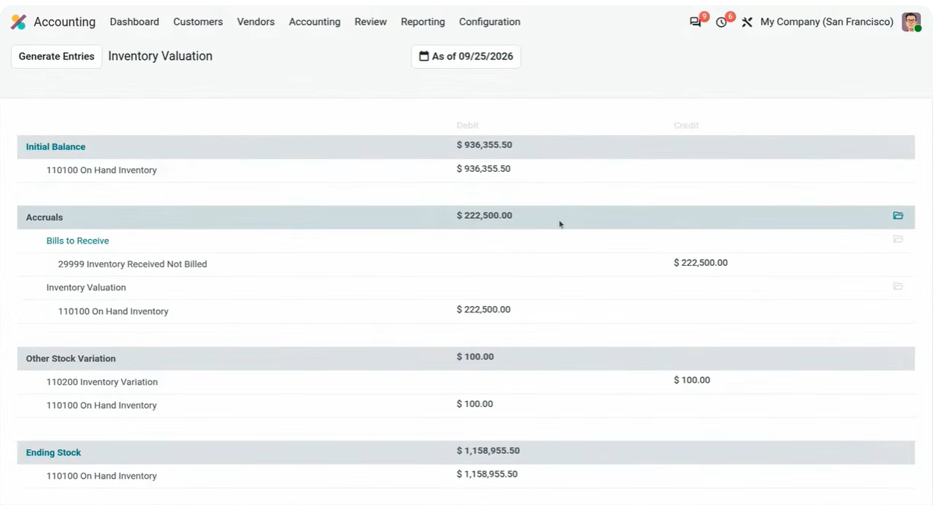
The valuation report of Odoo 20: each adjustment amount can be explored down to the concerned order lines.
03Updated approach costs, even after delivery
This is probably the most anticipated improvement. Let's imagine you buy 100 units, deliver 60 of them, and then the customs invoice arrives a week later. Until now, the products already sold were not impacted, except by manually selecting the correct transfers.
1 · An automatic allocation between sales and stock
In V20, you just need to assign the customs invoice to the receipt transfer of the 100 units. Odoo then automatically allocates the amount of approach costs :
- The 60 units already delivered : their share is added to the cost of sales. Odoo automatically finds the relevant customer invoices and updates them, with a trace in the chatter.
- The 40 units still in stock : their share increases the value of the stock.
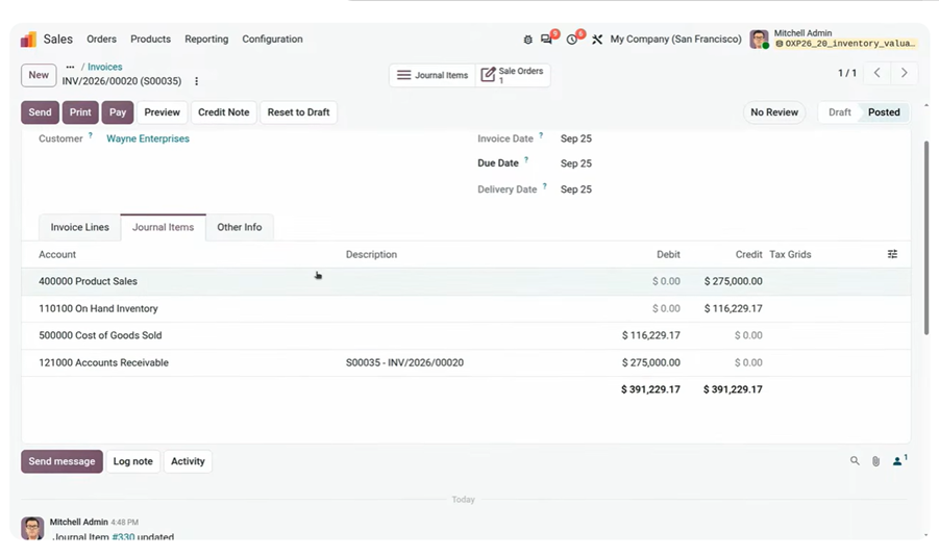
The customer invoice for the units already delivered is automatically updated: its cost of sales goes from about $112,000 to $116,229 to include the share of customs duties. The modification is tracked in the chatter.
2 · Easier to link charges billed by a third party
Customs duties are often billed by a third party, such as the tax administration, and not by your supplier. You can now search for receipts related to the original supplier directly from the transfer field.
3 · Closed periods respected
And what if the accounting period is already closed? Odoo does not modify past entries: the adjustment is automatically accounted for in the first open period.
04All value corrections in one place
A new menu Valuation adjustments, in the Inventory reporting, lists all changes that have impacted the stock value: date, description, product, concerned movement, unit cost, user, and adjustment amount.
To correct a value, for example due to a calculation or currency error, simply modify it from the movement analysis, adding a description. The history remains complete and traceable.
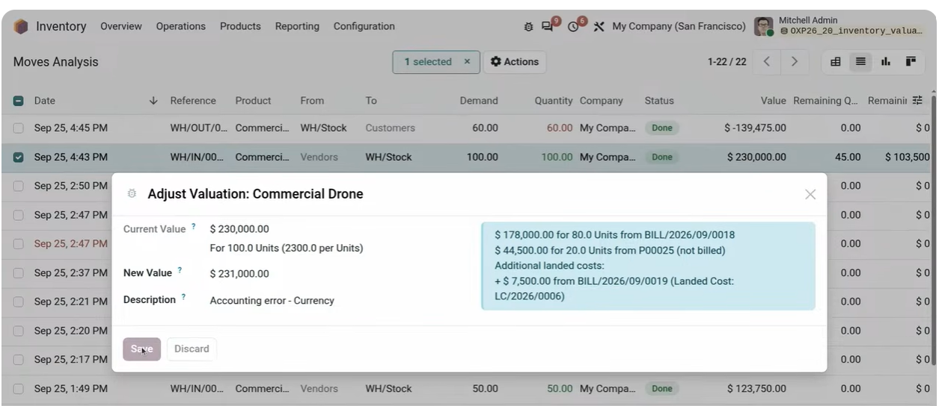
The Valuation adjustments menu tracks each correction: product, movement, unit cost, user, and amount.
05The return of the stock aging report
Disappeared in V19 with the removal of valuation layers, the stock aging report returns. It is available by default as a favorite filter in the movement analysis, to see when your items were purchased and which are still in stock.
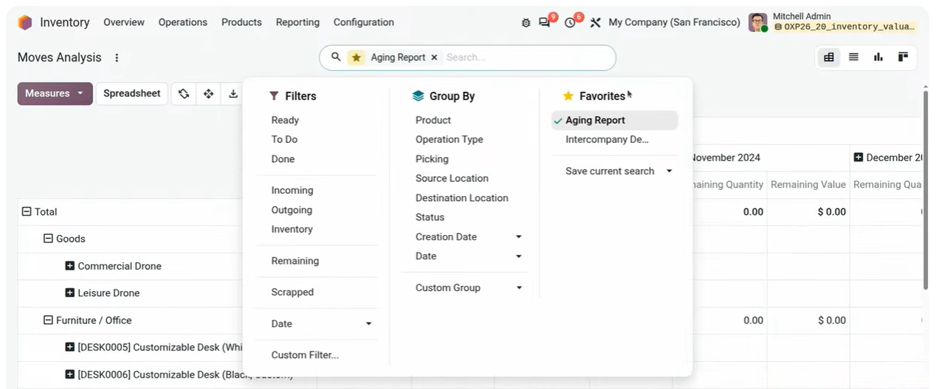
The stock aging report, available as a favorite filter in the movement analysis.
06When are the accounting entries made?
The stock accounting entries are generated at two times:
| Time | What is accounted for |
|---|---|
| Invoice validation | A supplier invoice directly impacts the stock. A customer invoice directly impacts the stock and the cost of sales, without an intermediate account. |
| End of period | The button "Generate Entries" in the valuation report creates the closing entries: goods received not invoiced, delivered not invoiced, and stock variations. They are automatically reversed the next day. |
This way, you obtain an accurate situation at closing, without distorting the following period. The cost method, the valuation method, and the accounts used are always configured based on the product category.
💡 The Nalios perspective
With the logic introduced in V19, the accuracy of your balance sheet depends on an end-of-period action: generating the closing entries. If no one clicks on "Generate Entries", the goods received or delivered not invoiced do not appear in your accounts.
Our recommendation: add this step to your monthly closing checklist for your Odoo accounting, and designate who assigns the customs invoices to the receipts. It is this attachment that makes your approach costs accurate.
These new features concern both accounting and logistics management in Odoo. If you are still on an earlier version, they become available with the migration of your Odoo database.
What to remember
Stock valuation in Odoo 20, in four points.
A reliable inventory valuation at each closing
Our consultants assist you in configuring your product categories, your approach costs, and your closing process in Odoo.
Discover Odoo AccountingSources: Odoo talk "Inventory Valuation & Perpetual Accounting", official Odoo documentation on approach costs.
Key questions
Answers to the most frequently asked questions about inventory valuation in Odoo 20.
No. As in V19, Odoo aggregates the movements of the period and posts the inventory entries upon invoice validation, then at the end of the period via the "Generate Entries" button. V20 mainly makes the valuation report much more detailed.
Assign the customs invoice to the original receipt transfer. Odoo 20 automatically allocates the amount: the portion of units already delivered is added to the cost of sales, with updates to the affected customer invoices, and the portion of units in stock increases the value of the inventory.
In the new Valuation Adjustments menu, in the Inventory reporting. It lists each modification with its date, description, product, movement, unit cost, user, and amount.
Yes, it returns in Odoo 20 after disappearing in V19. It is available by default as a favorite filter in the movement analysis.
Odoo does not modify past entries. The adjustment is automatically accounted for in the first open period.