
A successful bank reconciliation with Odoo
Odoo revolutionizes the bank reconciliation experience with a completely redesigned, AI-powered interface. Simpler, more intuitive, and above all more collaborative, this new module turns a traditionally tedious task into a smooth, intelligent, and efficient process.
To configure these reconciliation rules according to your specific bank flows, Nalios supports you as a certified Odoo partner in company accounting and finance.
Discover the innovations that make daily accounting easier for finance professionals.
A completely redesigned reconciliation screen
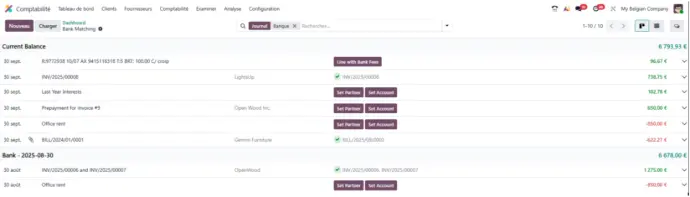
Odoo’s new bank reconciliation screen has been built to offer a cleaner, more fluid, and intuitive experience. Transactions are now presented in a clear and visual way:
- Incoming payments appear in green, for immediate recognition. Outgoing payments are displayed in red, making disbursements easy to identify.
- Each line now includes more contextual details, allowing accountants and financial managers to make faster, more accurate decisions.
Collaborate directly on your transactions
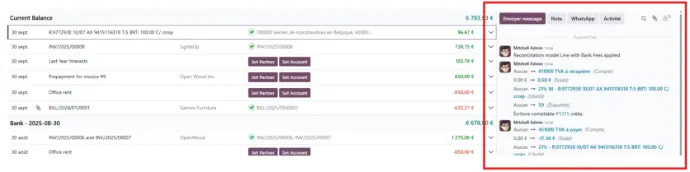
Odoo’s bank reconciliation screen now includes a chatter on each payment transaction, allowing finance teams to work more efficiently:
- Communicate in real time about a specific transaction — no need to switch tools.
- Review the full conversation history to keep a clear record of all decisions.
- Create and assign activities (follow-up, validation, reminders, etc.) directly from the transaction.
Each bank line becomes a true collaborative workspace, where information flows seamlessly and no action is missed.
A reconciliation process that learns from you
Thanks to Odoo’s built-in intelligence, bank reconciliation becomes smarter with every use.
The system learns from your previous actions and remembers your reconciliation choices.
- On the next reconciliation, Odoo automatically suggests the same logic.
- You save time by validating these smart suggestions with a single click.
- Reconciliation templates can also be generated automatically based on your actions.
Create vendor bills in one click
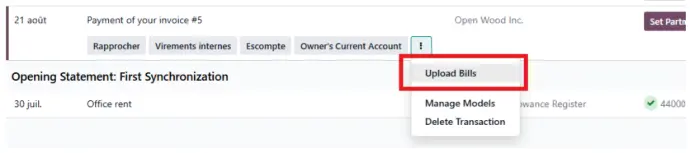
With Odoo, bank reconciliation goes beyond matching transactions. You can now upload a vendor bill directly from a bank transaction:
- Import the document during the reconciliation process.
- Odoo automatically creates the corresponding vendor bill.
- This feature saves time, avoids manual re-entry, and centralizes all supporting documents in one place.
Vendor bill management becomes faster, more reliable, and perfectly connected to your banking flows.
Learn more about the author of this article :

Axel Debève
Business Analyst
Business Analyst at Nalios France since May 2024. Always attentive and solution-oriented, Axel supports companies in understanding and optimizing their business needs with Odoo. Pragmatic and a good listener, he takes pride in analyzing business processes to deliver clear and tailored solutions. His mission: turning clients’ challenges into concrete and efficient solutions for their daily operations.