
How long does a pilot keep their hands on the controls? Much less than one might think: they pilot during takeoff and landing, then activate autopilot and monitor their screens. With Odoo 20, the automation of Odoo accounting allows the accountant to work in the same way.
This image opened the talk of the Odoo Accounting Expertise team at Odoo Experience 2026. In accounting, we often observe the opposite: structured data is available in bulk, but a large part of the time still goes into repetitive tasks, such as recurring entries, depreciation, tracking loans, or manual bank reconciliation.
The message of the talk is clear: in Odoo, entering an invoice is not an end in itself, but the starting point of a chain of automated actions. We summarized it in our article on the new features of Odoo 20 that will really make a difference. Here is the demonstration, step by step.
See the talk "Your accounting on autopilot with Odoo 20" (in English)
01Sort your documents with AI
The day starts in the Documents app, with four files received that very morning. Rather than opening them one by one, you just need to select them and launch the action Sort with AI. Behind the reception folder lies a prompt that tells Odoo how to process each document according to its content.
In the demonstration, the insurance certificate joined the Insurance folder, the contract the Legal folder, and the two supplier invoices the Finance folder. For these two invoices, Odoo also created a draft supplier invoice, ready to be verified in Accounting. To go further on these uses, see our approach to AI in Odoo.
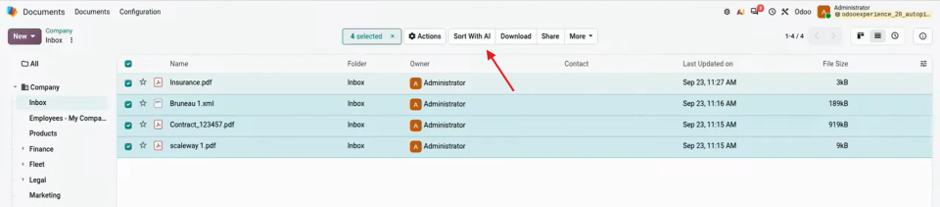
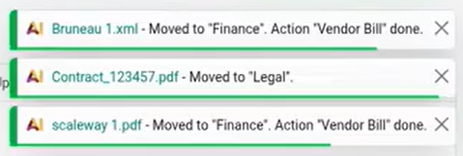
A single click on « Sort with AI » organizes each document into the correct folder and creates draft supplier invoices.
02Assets, fleet, and loans: entries that plan themselves
1 · An asset invoice that creates the asset
First invoice processed: the purchase of a vehicle for the fleet. The line is charged to an asset account and the vehicle is directly linked to it. Upon confirmation, a new smart button « Asset » appears.
Odoo created the asset avec sa valeur, sa date d'achat, le véhicule lié et sa valeur comptable. Comme l'achat date de quelques mois, cette valeur tient déjà compte des amortissements passés. Le bon modèle d'amortissement s'applique automatiquement : les écritures des mois écoulés sont comptabilisées, celles des mois à venir sont générées en brouillon et programmées pour la fin de chaque mois. L'actif est aussi relié à la fiche du véhicule dans l'app Flotte, avec sa plaque et son numéro de châssis.
A single click on "Confirm": the asset is created, depreciated, accounted for the past, and planned for the future.
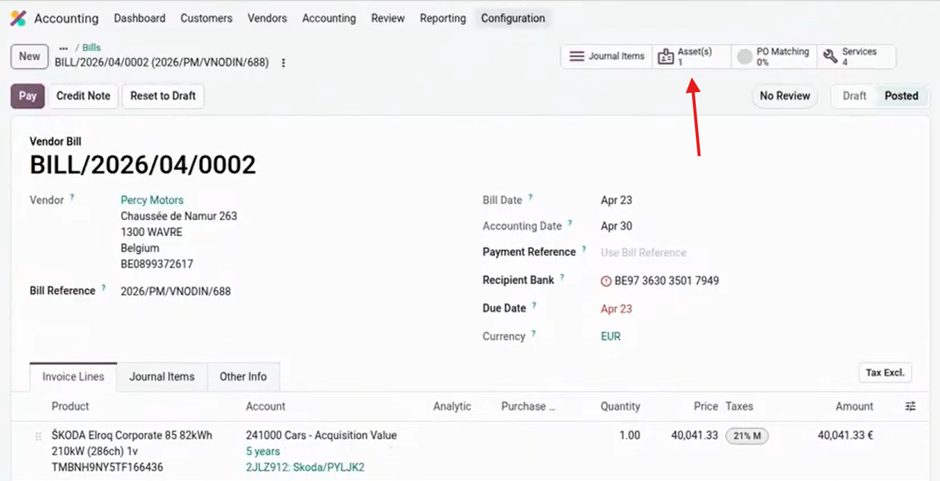
The asset is created upon invoice confirmation, with its depreciation schedule already calculated.
2 · Structured invoices automatically linked to vehicles
A second invoice, received by email, concerns the maintenance of the same vehicle. Its XML file contains the chassis number, the plate, and the model: Odoo thus links each line to the correct vehicle, without input. A click then groups the lines by VAT rate for a more readable invoice, while maintaining the link with the vehicle. After confirmation, the action "Organize documents" sends the PDF to the Fleet folder. This is the whole point of the electronic invoicing Peppol in Odoo : structured data that directly feeds your entries.
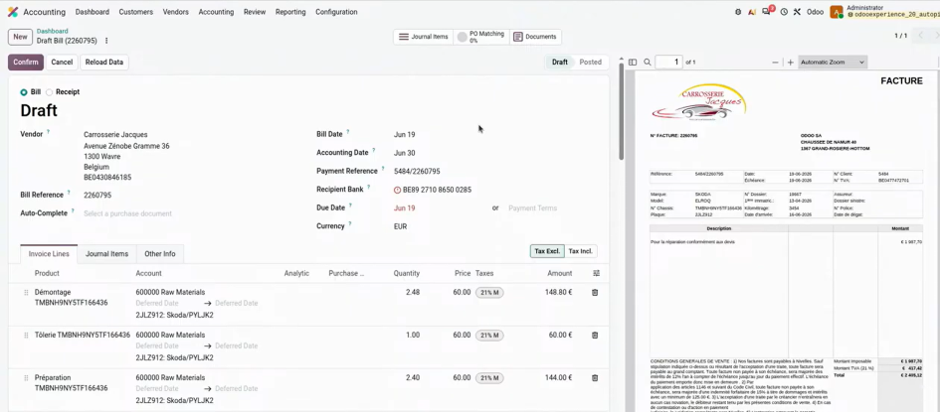
Thanks to the XML file, each line of the maintenance invoice is linked to the correct vehicle.
3 · A loan table imported in a few clicks
Pour financer ce véhicule, un emprunt bancaire a été contracté. Le tableau envoyé par la banque s'importe dans le menu Emprunts : we choose the columns (date, capital and interest), we test, then we import. The total amount, the interest and the duration are calculated, and the loan can join the same asset group as the vehicle.
Upon confirmation, Odoo accounts for the past months and prepares the following ones in draft, with automatic accounting on the first day of each month. This covers the capital, the interest, but also the reclassification between long-term and short-term debts, and its reversal, since it is recalculated every month.
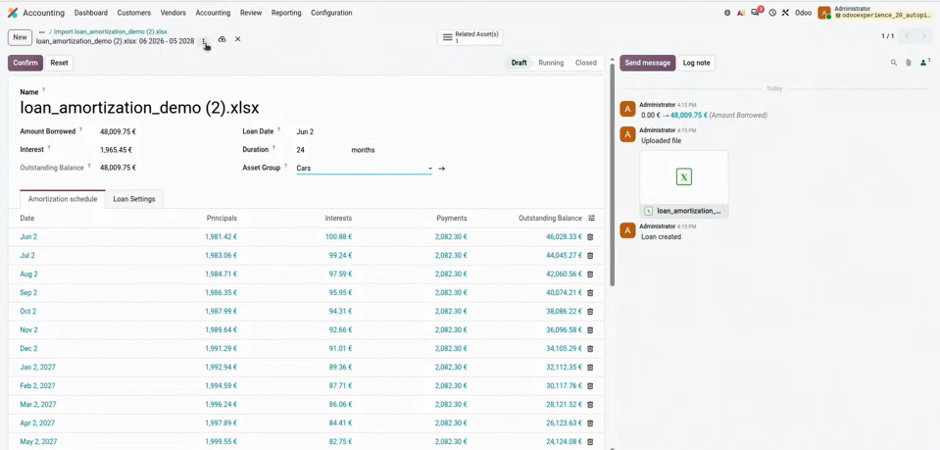
The bank loan table is imported directly, and the entries are planned month by month.
03Supplier invoices that almost process themselves
1 · Automatic reconciliation with the purchase order
The following invoice concerns equipment purchased for stock. The supplier indicated the purchase order number in the XML file: Odoo thus links the invoice to this purchase order, and a smart button displays the matching rate, here 100%. The reconciliation view compares quantities and prices line by line. On the Purchasing side, the purchase order automatically changes to "Fully Invoiced".
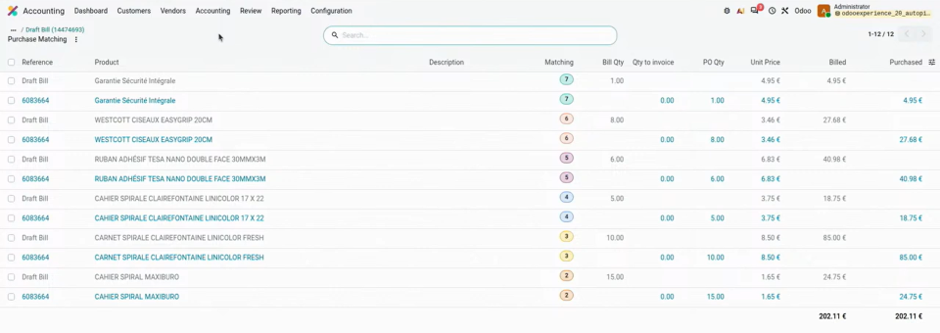
The reconciliation view compares order and invoice, line by line.
2 · An expense spread automatically over several months
A telephone subscription invoice arrives. Odoo immediately applies the correct analytical account, "Telephony", as it understands that invoices from this supplier always fall under this account. It is enough to indicate the covered period, from August 1 to October 31: upon confirmation, the deferred expenses are spread over August, September, and October, ready to be accounted for.
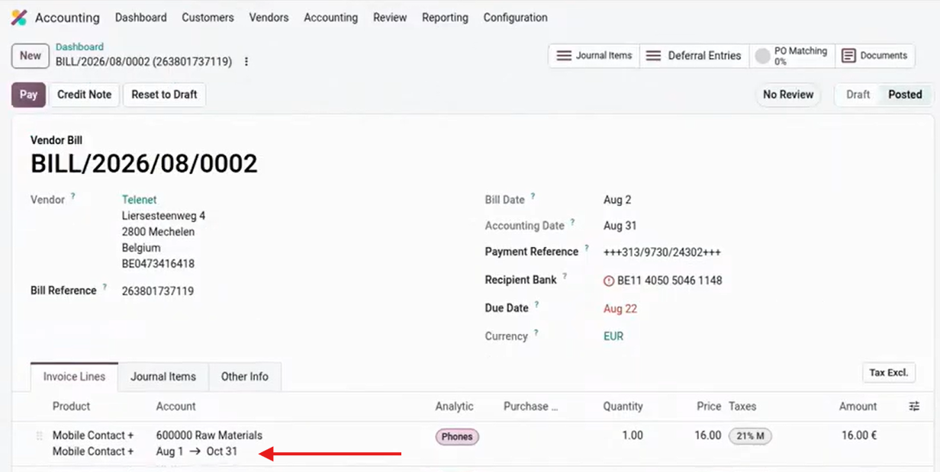
The subscription charge is automatically spread over the three covered months.
3 · The automatic validation of recurring invoices
This is one of the features that has most impressed the public. When confirming a lodging invoice, Odoo offers to activate the automatic validation, because this is the third consecutive time that an invoice from this supplier has been confirmed without modification.
Once the option is activated, the next invoice is scanned and then automatically accounted for. Odoo still displays a potential duplicate warning if the amount is identical to the previous invoice: you maintain control over your recurring costs.
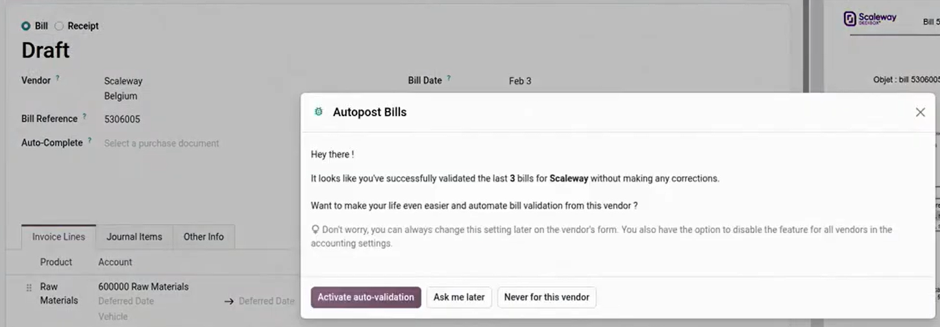
After three confirmed invoices without modification, Odoo offers automatic validation.
04A monthly closing and a VAT declaration under control
1 · Payables without the risk of duplication
Some products have been received but not yet invoiced. From the menu of invoices to be received, the relevant lines are selected and a journal entry of payables. Odoo offers the reversal on the first day of the following month and generates it at the same time.
If the operation is mistakenly repeated a few days later, a warning indicates that a journal entry already exists for this amount and date. Even when confirming, no duplicate is created: the original entry is simply replaced.
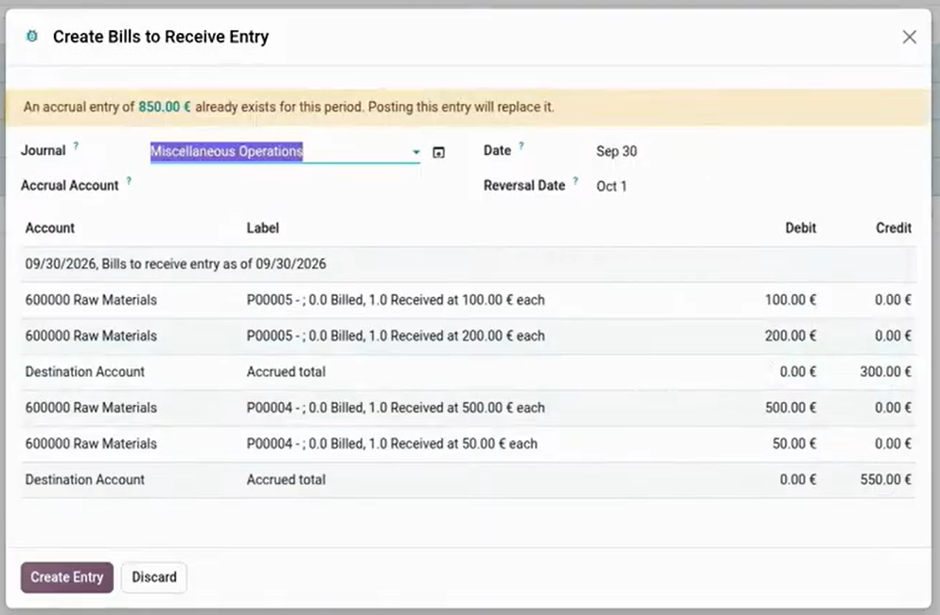
The liabilities to be paid are created from the received and unbilled lines, with their reversal.
2 · A VAT declaration guided by automatic controls
Before validating the quarterly VAT declaration, Odoo reviews a series of checks: unallocated bank transactions, missing attachments, or invoices still in draft. Each anomaly can be marked as reviewed or corrected directly from the screen.
We then preview the declaration by grid, and then validate it: the VAT closing entry automatically balances the VAT payable and recoverable accounts. The grids depend on your country and its tax location. The declaration can then be marked as submitted, and payment made via QR code or marked as paid.
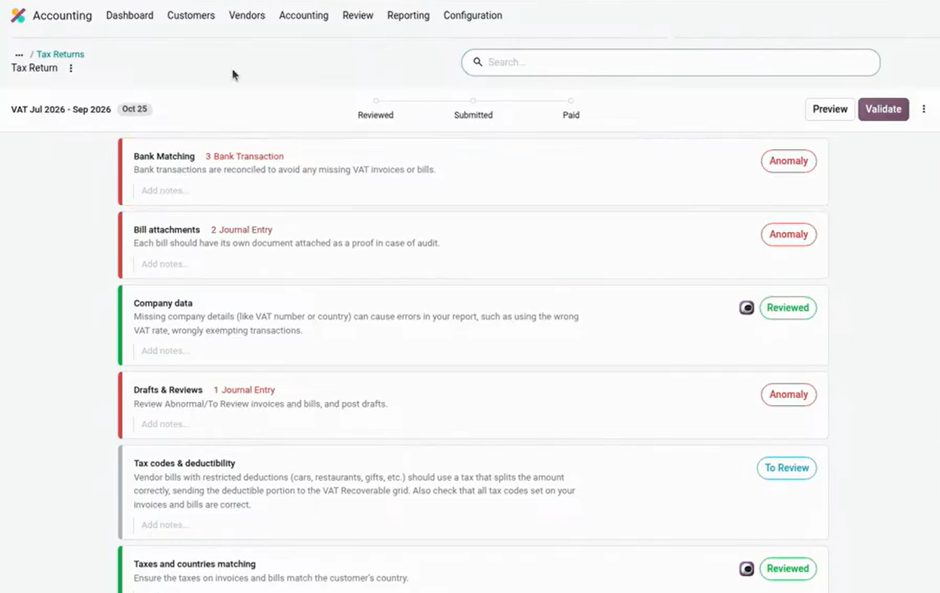
Before the VAT declaration, Odoo lists the anomalies to review or correct.
05Bank reconciliation templates created for you
Final step: the reconciliation of three payments related to the rental of a garage. For the first two transactions, direct allocation allows you to choose the rent account. For the third, Odoo has already created in the background a reconciliation template "Rent": one click is enough.
This template can then be automated in the bank reconciliation template settings. In the demonstration, a new transaction of €400 was automatically reconciled to the rent account, without intervention.
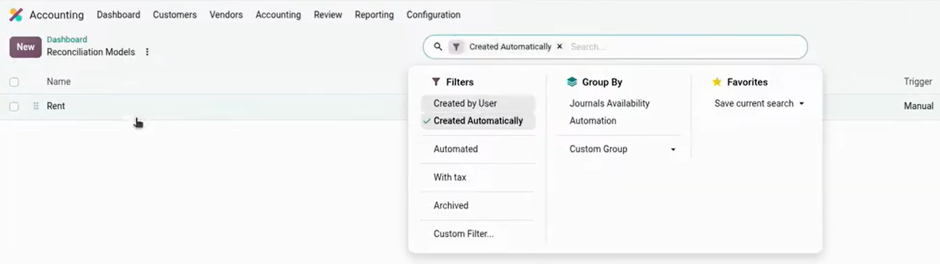
Odoo itself creates the reconciliation template from your repeated reconciliations.
| Starting point | What Odoo 20 automates |
|---|---|
| Received documents | AI classification and creation of draft supplier invoices |
| Investment invoice | Creation of the asset, past and future depreciation, link with the fleet |
| Loan table | Capital entries, interest, and long-term / short-term reclassification |
| Supplier invoices | Reconciliation with the order, deferred charges, automatic validation |
| Closure | Accrued expenses without duplicates, VAT controls, matching by templates |
💡 The Nalios perspective
All these automations rely on the same foundation: structured incoming data and a clean configuration (depreciation models, analytical accounts, product categories). Without this foundation, the autopilot has nothing reliable to rely on.
Our recommendation: start by generalizing the receipt of electronic invoices and by securing your templates, then activate the automations one by one, starting with recurring suppliers. You maintain control over what is accounted for without you.
These new features extend those of V19, detailed in our article on the 4 essential new features of Odoo 19 accounting.
What to remember
Like the airplane pilot, the accountant does not disappear: he supervises, checks, and decides.
Put your accounting on autopilot
Our experts help you set up and activate these automations in your Odoo accounting.
Discover Odoo AccountingSources : talk Odoo « Your accounting on autopilot with Odoo 20 », Odoo Experience 2026.
Key questions
The essentials on accounting automation in Odoo 20.
Yes, for recurring suppliers. After three consecutive confirmed invoices without modification, Odoo offers automatic validation. The following invoices are then scanned and accounted for alone, with an alert if the amount is identical to the previous one.
When the line is allocated to an asset account, confirming the invoice creates the asset with the correct depreciation model. Past depreciations are accounted for and the following ones are scheduled as drafts.
Yes, from the Loans menu. You choose the columns to import (date, principal, and interest), then Odoo calculates the total, the interest, and the duration and prepares all the entries, including the reclassification between long and short term.
He checks in particular the unlettered bank transactions, the missing attachments, and the invoices still in draft. Each anomaly can be corrected or marked as reviewed before validating the declaration.